Anker C1000 Gen 1 vs Gen 2: Is Expandability Worth Paying More for Less?
Our Verdict
The Anker SOLIX C1000 Gen 2 is the better power station for most buyers — faster charging (49 min vs 58 min), lighter weight (24.9 lbs vs 25.5 lbs), more continuous output (2,000W vs 1,800W), a thousand extra battery cycles (4,000 vs 3,000), and a lower price. The Anker SOLIX C1000 Gen 1 wins on exactly one dimension: expandability to 2,112Wh via the B1000 battery pack. If you know you will need more than 1,024Wh, the Gen 1 is the smarter long-term investment. For everyone else, the Gen 2 is the upgrade in every way that matters.
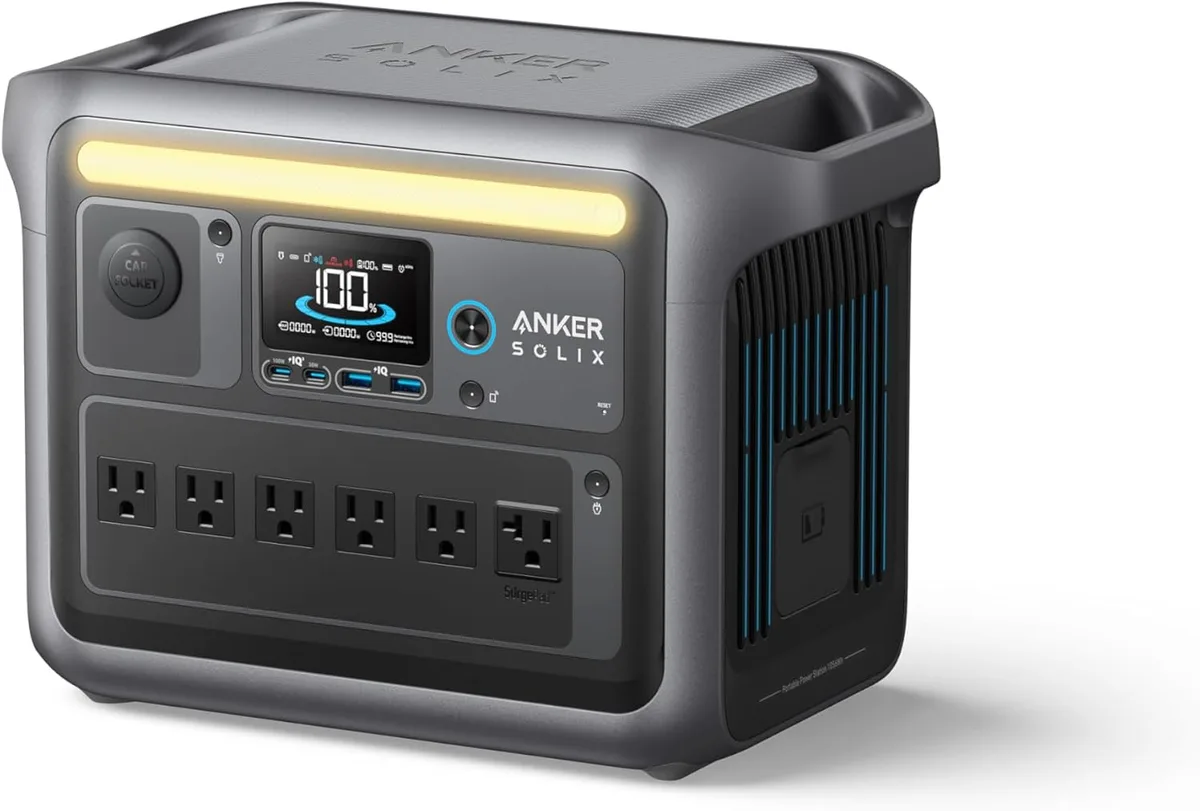
Anker SOLIX C1000
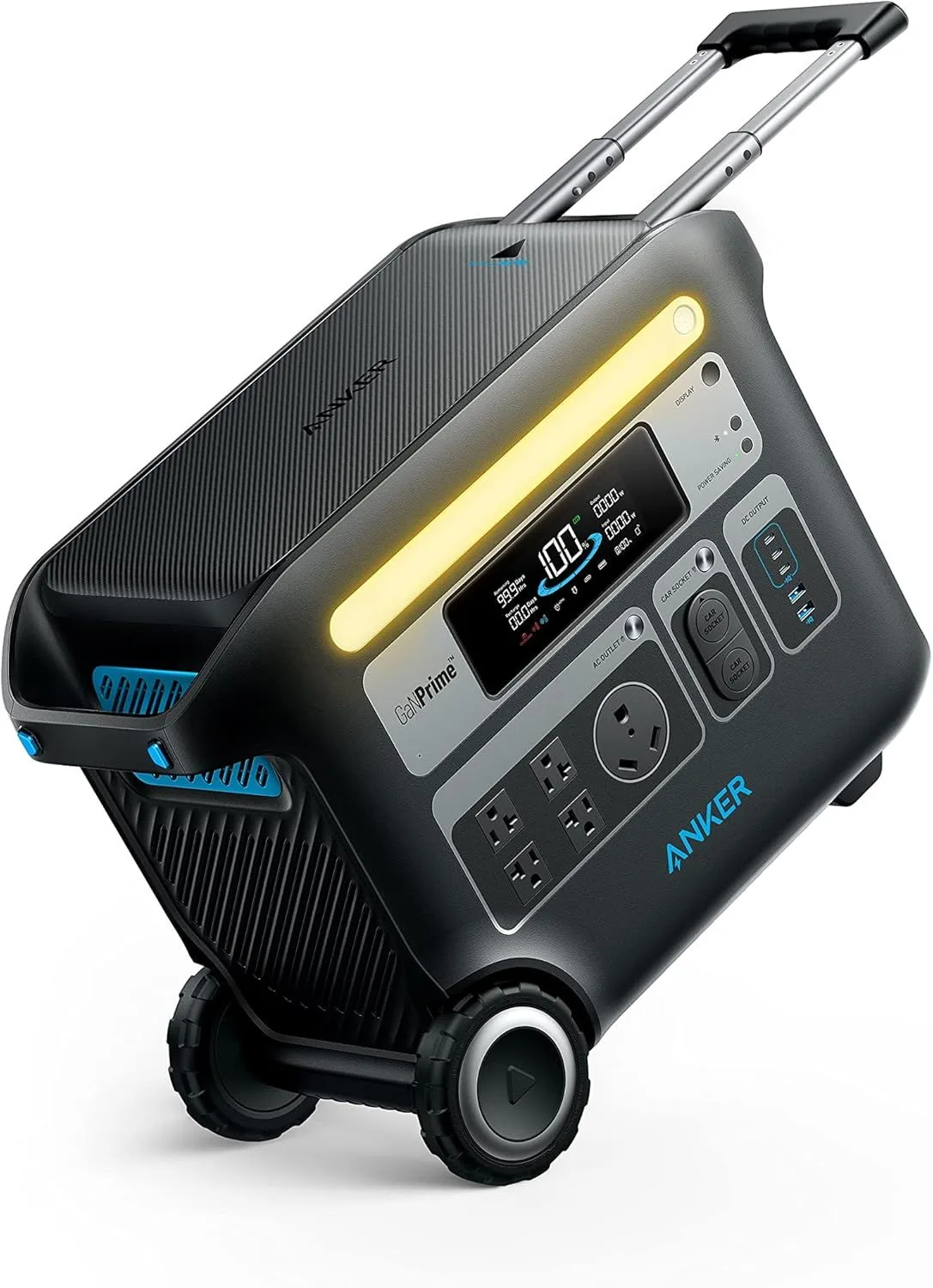
Anker SOLIX C1000 Gen 2
Same Name, Different Engineering Bets
Anker released the SOLIX C1000 Gen 2 in late 2025, and instead of simply improving the Gen 1, they made a deliberate trade: strip the expansion port, shed weight, shrink the chassis, and push charging speed to a world record. The Gen 2 is objectively better by every metric except one. That one exception — expandability — might be the only thing that matters to you.
The Gen 1 remains Anker's only C-series power station that supports the B1000 expansion battery. Adding a B1000 doubles capacity from 1,056Wh to 2,112Wh, turning a mid-range portable unit into a serious home backup system. The Gen 2, with its sealed single-battery design, caps at 1,024Wh permanently.
We compared both units using data from 2800+ Gen 1 Amazon ratings, 300+ Gen 2 ratings (newer listing, growing fast), and independent reviews from MacRumors, NotebookCheck, The Gadgeteer, Outdoor Gear Lab, TechRadar, and GearJunkie. The research paints a clear picture.
Specifications Side by Side
| Feature | Anker SOLIX C1000 Portable Power Station | Anker SOLIX C1000 Gen 2 Portable Power Station |
|---|---|---|
| Price Range | $500+ | $500+ |
| Battery Capacity | 1,056Wh | 1,024Wh |
| Battery Type | LiFePO4 | LiFePO4 |
| Output Power | 1,800W (2,000W SurgePad) | 2,000W |
| Surge Power | 2,400W | 3,000W (SurgePad) |
| Weight | 25.5 lbs | 24.9 lbs |
| Solar Input | 600W max (60V) | 600W max (60V) |
| Check Price | Check Price |
Wall Charging: 49 Minutes vs 58 Minutes
The Gen 2's HyperFlash technology pushes 1,600W to the battery for a Guinness-certified 49-minute full charge. MacRumors and 9to5Toys both independently verified this number. The Gen 1's UltraFast technology draws 1,300W for a 58-minute full charge, with 0-80% arriving in about 43 minutes. TechRadar confirmed these figures.
Nine minutes might sound marginal on paper. In practice, the Gen 2's charging advantage compounds. Over a weekend camping trip with two full charge cycles per day, you save 36 minutes. Over a month of daily use, the cumulative time savings add up to hours. And the Gen 2 reaches 80% in approximately 35 minutes versus 43 for the Gen 1 — a meaningful gap when you need a quick top-off before heading out.
Solar charging is identical. Both units accept up to 600W of solar input and reach full in approximately 1.8 hours with a matched panel array. The Gen 2's AC speed advantage does not carry over to solar — the bottleneck shifts to panel output, where both units share the same ceiling.
Thermal management during charging differs between the two units. The Gen 2's HyperFlash system runs the fans harder during the 49-minute sprint — audible from across the room, but finished before you finish a cup of coffee. The Gen 1 charges at a slightly lower rate with less aggressive cooling, spreading the heat and noise over a longer window. Neither approach is objectively superior — just different thermal philosophies for different engineering priorities.
Continuous Output: 2,000W vs 1,800W
The Gen 2 delivers 2,000W continuous with a 3,000W SurgePad surge. The Gen 1 delivers 1,800W continuous with a 2,400W SurgePad surge. That 200W gap and 600W surge gap are real differences.
The Gen 1's SurgePad outlet is an interesting feature — it uses voltage management to handle appliances up to 2,400W on that single outlet, similar to EcoFlow's X-Boost. GearJunkie's reviewer ran a 1,500W portable heater through it during a cold night. But the Gen 2's standard outlets handle 2,000W continuous without needing a special port, and the 3,000W surge ceiling accommodates larger compressor startups.
For most camping and home backup scenarios (phones, laptops, LED lights, a small fridge, a CPAP machine), both units have more than enough output. The gap becomes relevant with high-draw appliances: a 1,900W space heater runs fine on the Gen 2 but would trip the Gen 1's standard outlets, forcing you to use the single SurgePad port.
The surge difference matters more than the continuous difference for many buyers. A standard household refrigerator pulls 100-200W continuous but can spike to 800-1,200W on compressor startup. A window AC unit rated at 1,000W can surge to 3,000W. The Gen 2's 3,000W surge ceiling handles these spikes without breaking a sweat. The Gen 1's 2,400W ceiling means larger compressor-based appliances may trigger the overload protection, shutting down the outlet momentarily and potentially interrupting whatever was running alongside it.
The Gen 1's Sole Advantage: Growing to 2,112Wh
This is the only category where the Gen 1 definitively beats its successor. The B1000 expansion battery connects to the Gen 1 and doubles capacity from 1,056Wh to 2,112Wh. The Gen 2 has no expansion port — the hardware slot was physically removed during the redesign to achieve the smaller, lighter chassis.
A Best Buy reviewer in Florida uses the expanded Gen 1 (with B1000) as a permanent UPS for their home office. During a 4-hour hurricane outage, the 2,112Wh system kept dual monitors, a desktop PC, a router, and a modem running without interruption. That kind of capacity requires buying two Gen 2 units (2,048Wh total) — which costs far more than one Gen 1 plus one B1000.
The question is whether you actually need 2,112Wh. For weekend camping, tailgating, and short outages, 1,024-1,056Wh is plenty. But for extended outages, off-grid cabins, full-time RV life, or powering a home office for a full workday during an emergency — the Gen 1's expansion path provides a real safety margin the Gen 2 can never match.
There is also a reliability angle. A single expanded unit (Gen 1 + B1000) means one inverter, one charge controller, one display, one set of outlets. If the main unit fails, the B1000 battery is useless on its own — it has no inverter and no outputs. Two separate Gen 2 units provide redundancy: if one unit fails, the other continues to operate independently. For critical backup applications where uptime matters, two independent units offer better fault tolerance than one expandable unit.
Size and Weight: What Anker Gained by Dropping Expansion
The Gen 2 weighs 24.9 lbs at 15.12 × 8.19 × 9.61 inches. The Gen 1 weighs 25.5 lbs at 14.8 × 8.07 × 11.02 inches. The Gen 2 is 0.6 lbs lighter and nearly 1.5 inches shorter in height — a noticeable difference when sliding it into a car trunk alongside coolers and gear bags.
The weight difference becomes more pronounced if you consider the expanded Gen 1. Adding a B1000 roughly doubles the weight you are hauling. A single Gen 2 at 24.9 lbs versus a Gen 1 plus B1000 at roughly 50 lbs is a completely different carrying experience. For static home backup, weight is irrelevant. For anything involving transport — camping, tailgating, van life — the Gen 2's compact single-unit design wins decisively.
The height difference is more noticeable than you might expect. At 11.02 inches tall, the Gen 1 barely fits under most car seats and takes up more vertical space in overhead cabinets. The Gen 2, at 9.61 inches, slides under seats more easily and stacks better alongside coolers and gear. For RV owners measuring every inch of storage, those 1.4 inches of vertical savings add up across a crowded galley or cargo bay.
Handle design also differs between the two generations. The Gen 2 uses a more ergonomic recessed grip that sits flush with the top panel when not in use, reducing snag points when sliding the unit into tight spaces. The Gen 1's handle protrudes slightly more, adding to the effective height when stacked. For trunk organization — where you are fitting a power station alongside a cooler, camp chairs, and grocery bags — the Gen 2's flatter profile makes a noticeable difference in how efficiently you can pack. Neither unit has wheels, which is appropriate at 25 lbs — you are carrying it regardless, and wheels would only add weight and failure points at this size.
Cycle Life: 1,000 Extra Cycles Is Real Money
The Gen 2 is rated for 4,000 cycles to 80% capacity. The Gen 1 is rated for 3,000 cycles to 80%. That 1,000-cycle gap means the Gen 2's battery maintains usable capacity approximately 2-3 years longer under identical usage patterns.
Put differently: if you cycle the battery once per day, the Gen 1 reaches 80% capacity around year 8, while the Gen 2 holds above 80% through year 11. For a product that costs several hundred dollars, three extra years of full-capacity life is a substantial return on investment.
The Gen 2 also demonstrated industry-best standby retention. MacRumors left it fully charged and powered off for a month — zero charge loss. The Gen 1 does not have equivalent third-party standby data, but Amazon reviewers report measurable idle drain when leaving it on standby with the display active.
Both use LiFePO4 battery chemistry, which is more thermally stable than NMC lithium-ion and safer for indoor use. The key difference is that Anker improved the cell packaging and battery management system between generations. The Gen 2's BMS monitors individual cell voltages more granularly and balances them more frequently, which contributes to both the longer cycle life and the zero-loss standby performance. These are not marketing claims — they are measurable improvements in how the battery cells are managed over thousands of charge cycles.
Ports: More Outlets vs Better USB-C
The Gen 1 has 11 ports: 6 AC outlets (5 standard + 1 SurgePad), 2 USB-A, 2 USB-C (100W each), and 1 car port. Outdoor Gear Lab praised the generous spacing between AC outlets. The Gen 2 has 10 ports: 5 AC outlets, 1 USB-A, 3 USB-C (two at 140W, one at 100W), and 1 car socket.
The Gen 1 wins on AC outlet count — six versus five. For running multiple household appliances during an outage, that extra outlet matters. But the Gen 2 wins decisively on USB-C quality: dual 140W PD ports are the highest in the entire mid-range class, fast-charging even the latest MacBook Pro at maximum speed. The Gen 1's USB-C maxes at 100W per port.
For tech-heavy users (content creators, digital nomads, anyone charging multiple laptops and tablets), the Gen 2's USB-C ports justify the trade-off alone. For home backup users running kitchen appliances, the Gen 1's extra AC outlet provides more simultaneous connections.
The Pricing Paradox: Newer, Better, and Cheaper
The Gen 2 lists at $500+ while the Gen 1 sits at $500+ — the older, less capable unit costs more at MSRP. This is unusual. Typically, a superseded model drops in price. The Gen 1's higher sticker reflects its expansion capability, but it creates an awkward value proposition: you pay more and get less on every metric except expandability.
The math changes on sale. Both Anker units frequently drop during Amazon events. When the Gen 1 hits the $400-500 range, its expandability becomes much more attractive — especially if you plan to add a B1000 later. At $400 for the base unit plus the B1000 cost, you are looking at roughly the same total outlay as two Gen 2 units for comparable total capacity (2,112Wh vs 2,048Wh), but with the convenience of a single integrated system.
One Question Decides Everything
Get the Anker SOLIX C1000 if you...
- ✓ Plan to expand to 2,112Wh with the B1000 battery pack
- ✓ Need 6 AC outlets for running multiple household appliances simultaneously
- ✓ Found it on sale below $500 and will use the expansion path
- ✓ Want a single integrated system rather than managing two separate units
Get the Anker SOLIX C1000 Gen 2 if you...
- ✓ Want the fastest charging in portable power — 49 minutes, Guinness-certified
- ✓ Frequently transport your power station and value lighter weight
- ✓ Need 140W USB-C for fast-charging laptops and tablets at maximum speed
- ✓ Plan to use one unit for years and want maximum battery longevity (4,000 cycles)
- ✓ Do not need more than 1,024Wh of capacity
For most buyers, the Gen 2 is the right call. Faster, lighter, cheaper, longer-lasting — it outclasses its predecessor on every spec that matters for single-unit use. The Gen 1 earns its recommendation only for buyers who have a concrete plan to expand to 2,112Wh. "I might want more capacity someday" is not a strong enough reason to accept slower charging, heavier weight, fewer cycles, and a higher price.
There is also the question of app experience. Both units pair with the Anker app via Bluetooth, but the Gen 2 received a refreshed firmware cycle with improved real-time power flow monitoring and granular charge scheduling. You can set the Gen 2 to charge only during off-peak electricity hours (typically 9 PM to 6 AM), which shaves a few dollars off each charge cycle in states with time-of-use utility billing. The Gen 1's app supports basic monitoring and manual scheduling, but the interface feels a generation behind the Gen 2's. For a device you interact with daily — checking charge status, toggling outlets remotely, setting departure-ready timers — the Gen 2's software polish is a quality-of-life improvement that compounds over months of ownership.
One final consideration: warranty and long-term support. Both units carry Anker's standard 5-year warranty covering battery degradation below 60% within the rated cycle count. But the Gen 2's 4,000-cycle rating versus the Gen 1's 3,000 cycles means the warranty period covers a larger percentage of the battery's total lifespan. If you cycle once per day, the Gen 1's warranty expires at year 5 with roughly 1,175 cycles remaining on the clock. The Gen 2's warranty expires at year 5 with 2,175 cycles remaining — nearly double the post-warranty runway. That extra longevity is not just a spec sheet number; it translates directly into years of use before you need to think about a replacement.
Three Real Buyer Scenarios
The weekend camper who charges at home Friday night and returns Sunday: Gen 2. You need fast pre-trip charging (49 minutes while loading the car), light weight for carrying from the parking lot to the campsite, and enough capacity for phone charging, LED lighting, a portable cooler, and a CPAP machine for two nights. A single Gen 2 handles all of that at 1,024Wh with room to spare.
The home office worker in a storm-prone area who loses power 3-5 times per year for 4-8 hours: Gen 1 with B1000. A dual-monitor desktop setup with router and modem draws roughly 300-400W. Over 8 hours, that is 2,400-3,200Wh — beyond the Gen 2's capacity but within reach of the expanded Gen 1 at 2,112Wh (enough for approximately 5-6 hours at full load, with margin if you dim monitors and disconnect non-essentials).
The digital nomad working from coffee shops, co-working spaces, and Airbnbs: Gen 2. The 140W USB-C ports fast-charge a MacBook Pro at maximum speed. The 24.9 lbs weight is manageable for one person carrying it across town. The 49-minute wall charge means 30 minutes at any outlet gives you hours of laptop runtime. And 4,000 battery cycles means the unit outlasts the laptop by several generations.
Common Questions About the C1000 Gen 1 vs Gen 2
Is the Anker SOLIX C1000 Gen 2 just a better version of the Gen 1?
Not exactly — the Gen 2 is faster, lighter, and cheaper, but it sacrificed expandability. The Gen 1 supports the B1000 expansion battery to reach 2,112Wh. The Gen 2 cannot expand at all. If you need growth potential, the Gen 1 is the better buy. If you want the most refined single unit, the Gen 2 wins on every other metric.
Can the Gen 1 B1000 expansion battery work with the Gen 2?
No. Anker removed the expansion port from the Gen 2 design entirely. The B1000 battery pack only connects to the original C1000 Gen 1. This is not a firmware limitation — it is a physical hardware difference. The expansion slot does not exist on the Gen 2 chassis.
Which has better surge handling for refrigerators and AC units?
The Gen 2 wins on surge — 3,000W SurgePad versus the Gen 1's 2,400W. Compressor-based appliances like refrigerators draw 3-5x their rated watts during startup. The Gen 2's higher surge ceiling handles more powerful compressors without tripping. The Gen 1's SurgePad outlet is limited to 2,400W, which may not handle large chest freezers or window AC units.
How much does the B1000 expansion battery cost?
The Anker B1000 expansion battery typically runs in the mid-range price tier — adding roughly the same cost again as the base unit for an additional 1,056Wh. Check current Amazon pricing for the exact cost. Factor this into the total system cost when comparing the expanded Gen 1 (2,112Wh) against two standalone Gen 2 units (2,048Wh total).
Which charges faster from solar panels?
Both accept up to 600W of solar input — identical capability. With a matched 600W panel array, both reach full charge from solar in approximately 1.8 hours. The Gen 2 pulls ahead on AC charging: 49 minutes versus 58 minutes from a wall outlet. Solar performance is a true tie.
Should I buy the Gen 1 now that the Gen 2 exists?
Only if you specifically plan to expand capacity with the B1000 battery. The Gen 1 at full MSRP is $50 more than the Gen 2 while delivering less continuous output, slower charging, fewer battery cycles, and heavier weight. But when the Gen 1 goes on sale to the $400-500 range (which happens frequently), it becomes a strong value as an expandable platform.
Can I use either unit as a UPS for my computer?
Both units support UPS mode with automatic switchover when the grid drops. The Gen 2 has a faster switchover time — under 20ms, which is within the tolerance of most desktop power supplies and all laptop chargers. The Gen 1 also supports UPS mode with a similar switchover speed. For CPAP machines, both units are well-suited: CPAP devices draw 30-80W, giving you 12-30+ hours of runtime on a single charge depending on your pressure settings and humidifier use.
How loud are these units during charging and discharging?
The Gen 2 is noticeably louder during its 49-minute HyperFlash charge cycle — the fans ramp up aggressively to manage the thermal load from pushing 1,600W into the cells that quickly. Once charged, operation is quiet under normal loads. The Gen 1 charges more slowly and generates less heat, so fan noise during charging is more subdued. During discharge, both units are quiet at moderate loads. The fans spin up proportionally to draw — a 200W load is near-silent, while a sustained 1,500W load produces audible fan noise from both units.
Which Anker C1000 Fits Your Setup?
The Gen 2 is the better standalone power station. The Gen 1 is the better expandable platform. Check current pricing — Anker sales often close the gap enough to change the recommendation.